


OPPO has officially begun rolling out its March 2026 system update, bringing the latest Android security patch alongside a couple of notable new features. The rollout started on March 10 and is expected to be completed by March 31, with over 100 OPPO smartphones scheduled to receive the update within this window.
Unlike typical monthly patches, this update goes beyond security improvements by introducing functional upgrades aimed at improving productivity and user safety. Many users have already started receiving the update, and a wider rollout is currently in progress.
New features and improvements in the March update
The March 2026 update introduces two key additions that stand out from previous releases. One of them is the ability to import class schedules directly from the Calendar app, making it easier for students and professionals to manage their daily routines without relying on third-party tools.
Another major highlight is the new AI-powered call fraud prevention feature. This enhancement is designed to detect and warn users about suspicious or potentially fraudulent calls in real time, adding an extra layer of security against scams.
In addition to these features, the update includes the latest Android security patch for March 2026, addressing known vulnerabilities and improving overall system stability and performance.
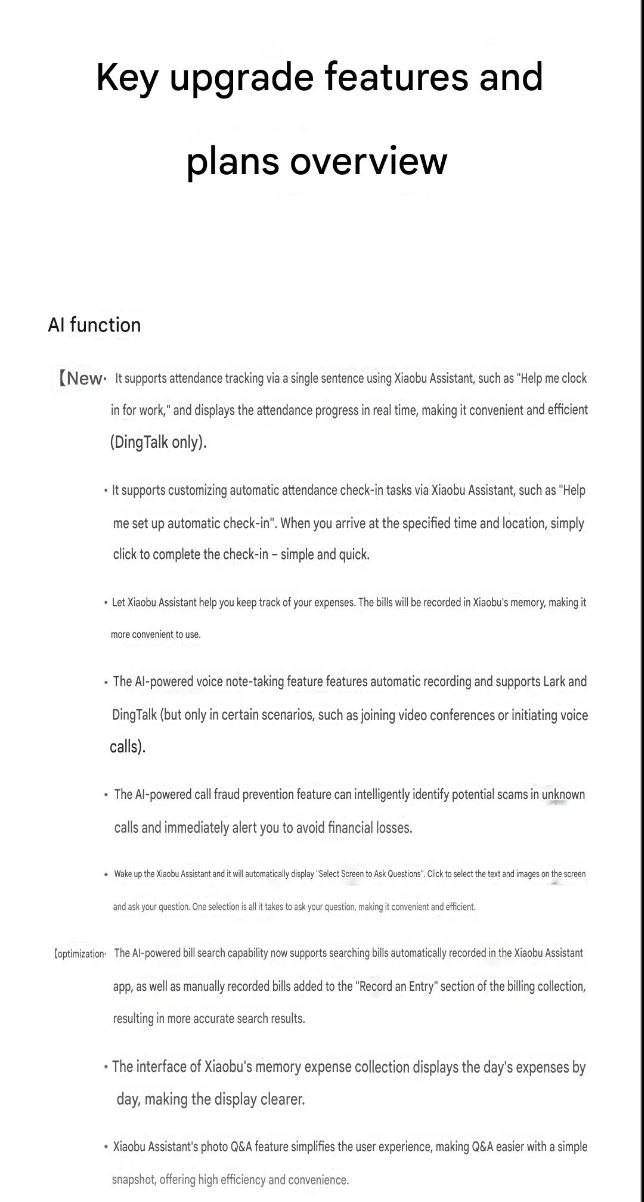
OPPO ColorOS March 2026 update full changelog
AI Functions
New
It supports attendance tracking via a single sentence using Xiaobu Assistant, such as “Help me clock in for work,” and displays the tracking progress in real time, making it convenient and efficient (DingTalk only).
It supports customizing automatic attendance check-in tasks via Xiaobu Assistant, such as “Help me set up automatic check-in”. When you arrive at the specified time and location, simply click to complete the check-in – simple and quick.
Let Xiaobu Assistant help you keep track of your expenses. The bills will be recorded in Xiaobu’s memory, making it more convenient to use.
The AI-powered voice note-taking feature automatically records audio and supports Lark and DingTalk (but only in certain scenarios, such as joining video conferences or initiating voice calls).
The AI-powered call fraud prevention feature can intelligently identify potential scams in unknown calls and immediately alert you to avoid financial losses.
Wake up the Xiaobu assistant and it will automatically display “Select Screen to Ask a Question”. Click to select the images and text on the screen and ask a question. It’s quick and efficient.
optimization
The AI-powered bill search capability now supports searching bills automatically recorded in the Xiaobu Assistant app, as well as manually recorded bills added to the “Record an Entry” section of the billing collection, resulting in more accurate search results.
The interface of Xiaobu’s memory expense collection displays the day’s expenses by day, making the display clearer.
Xiaobu Assistant’s photo Q&A feature simplifies the user experience, making Q&A easier with a simple snapshot, offering high efficiency and convenience.
Communication and Interconnection
New
The Windows PC client supports the “Share with OPPO Connect” shortcut. After connecting to your phone/tablet, you can share local files to the device with a single right-click.
OPPO/OnePlus file transfer now includes an “Automatically open received files” switch, allowing users to choose whether received files are automatically opened, thus optimizing the file viewing experience.
After mirroring your phone screen to your computer, hovering the mouse over an icon in the phone window will display the icon’s function name, making it easier to understand.
optimization
The layout and interface design of the vehicle details page and the vehicle equipment panel in the device space of the smart vehicle system result in clearer information display.
Xiao Bu suggests fluid clouds
New
Xiaobu’s recommendations include displaying sleep cards to provide sleep reminders and summaries. It can also offer scientific sleep therapy courses based on your sleep habits to help you fall asleep easily.
Xiaobu suggests that the system should display a data management card for easy data management.
Other functions
New
Supports importing course schedules into the calendar, providing a detailed view of daily courses and making course viewing more convenient.
Supports displaying temperature and typhoon information on weather maps, allowing real-time viewing of regional temperature distribution and typhoon dynamics.
Abnormal weather notification service provides real-time alerts for sudden weather changes, protecting your daily travel.
Some third-party applications support access to ColorOS’s confidential computing space to enhance security and comprehensively improve payment security.
The app blocking function will prevent the app from launching when it is detected as potentially fraudulent, thus protecting your assets.
Content Portal supports selecting cloned applications, making content sharing more convenient. It allows you to send addresses directly to the vehicle’s infotainment system via Content Portal, eliminating the need for manual input and making operation more convenient.
optimization
Improve battery life and frame rate stability in “Roco Kingdom: World” to enhance the gaming experience.
It’s worth noting that this is not the ColorOS 16 upgrade, but a security-focused update that is being deployed to devices running ColorOS 13 and newer versions. Users who haven’t received the update yet can manually check by heading to the System Update section in their device settings.
Complete list of OPPO phones receiving the OPPO ColorOS March system update
- OPPO Find N6
- OPPO A6 series
- OPPO Find N5
- OPPO A5 series
- OPPO Find N3
- OPPO A3 series
- OPPO Find N2
- OPPO A2 series
- OPPO Find N
- OPPO A1 series
- OPPO Find X9 series
- OPPO A97
- OPPO Find X8 series
- OPPO A95
- OPPO Find X7 series
- OPPO A58 series
- OPPO Find X6 series
- OPPO A57
- OPPO Find X5 series
- OPPO A56s
- OPPO Find X3 series
- OPPO A55 series
- OPPO Reno15 series
- OPPO K13 series
- OPPO Reno14 series
- OPPO K12 series
- OPPO Reno13 series
- OPPO K11 series
- OPPO Reno12 series
- OPPO K10 series
- OPPO Reno11 series
- OPPO K9 series
- OPPO Reno10 series
- OPPO Pad 5
- OPPO Reno9 series
- OPPO Pad 4 Pro
- OPPO Reno8 series
- OPPO Pad 3 series
- OPPO Reno7 series
- OPPO Pad 2
- OPPO Reno6 series
- OPPO Pad
- OPPO Reno5 series
- OPPO Pad Air series
- OPPO Pad SE
The list for the Chinese release. Meanwhile, Global rollout has commenced with many people reporting the arrival of the update. You can check the update section on your device and install it.


