


With the HyperOS 3.1, Xiaomi is implementing a fundamental shift in its update infrastructure, introducing a system called “SOTA” (Super-OTA), a rarity in the Android world. System updates are transforming from bulky packages requiring reboots into instant, seamless software patches.
Here are the details of this new system observed on the Xiaomi 17 Pro and the meaning behind the changing version numbers:
1. New Version Format: OS3.0.X.0.CY
The standard version numbers we were used to seeing (like OS1.0.1.0.UMBCNXM) have gained a new extension with HyperOS 3.
-
Old Format:
OS3.0.X.0(Tracked only main system updates). -
New Format:
OS3.0.X.0.CY-
X (Main Version): Includes Android security patches or major system changes. When this number changes, the device must be rebooted.
-
Y (SOTA Version): These are the tags at the end like
C05orC06. This part indicates that system applications and core modules have been updated. When this number changes, no reboot is required.
-
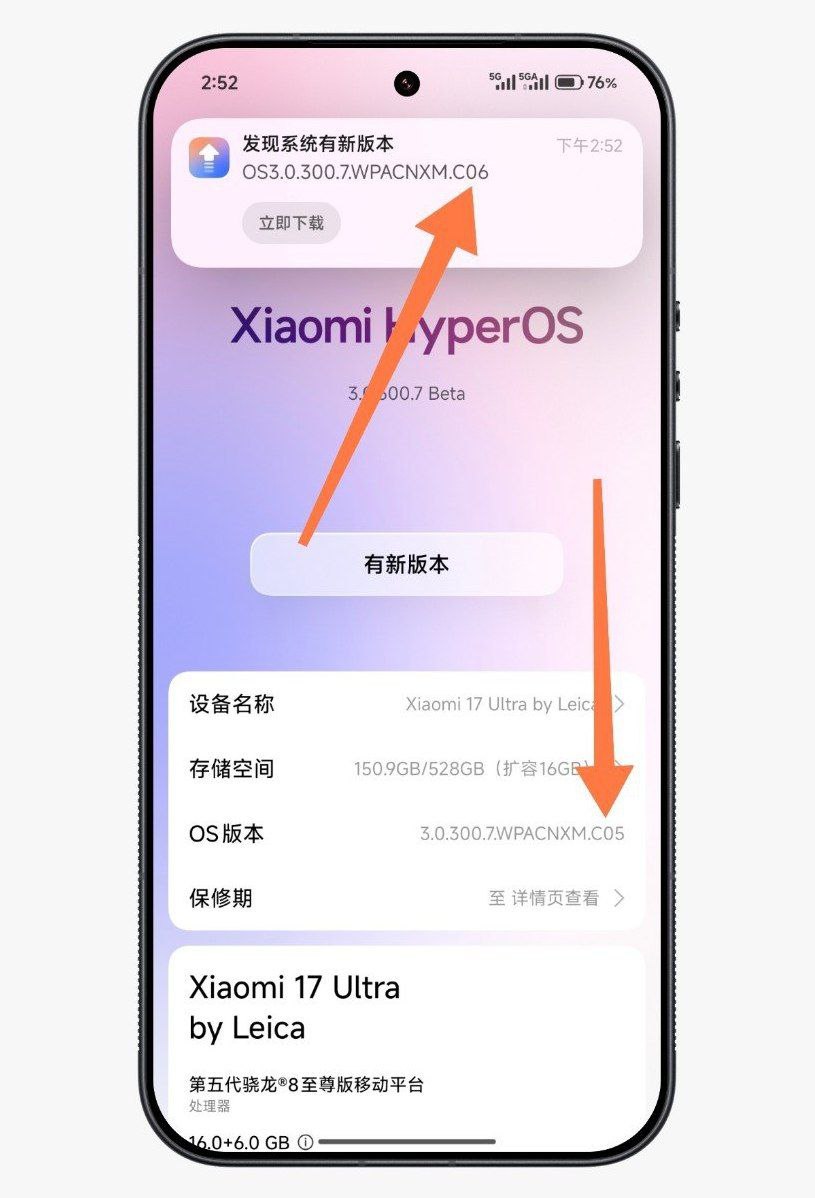
2. What is SOTA (Super-OTA)?
SOTA is Xiaomi’s branding for “Software Over The Air,” marketed as “Super-OTA.”
-
No Reboot Needed: SOTA updates download and install in the background, just like updating an app from the Play Store. It does not interrupt the user or require turning the phone off and on.
-
Gray Prompt: If your system is already up to date but a SOTA package arrives, Xiaomi may show a gray notification indicating this supplementary patch instead of the usual “System Updated” screen.
3. Technical Shift: “Installing” Instead of “Flashing”
Traditional Android updates (Recovery ROM/Fastboot) worked by writing images over hard drive partitions (flashing). This is why a reboot was strictly necessary to switch partitions.
With SOTA, Xiaomi changes this logic:
-
Packaging: All system software and critical system apps (Launcher, Security, SystemUI Plugin, etc.) are bundled into a single package.
-
Location: Downloaded files are now stored in a specific folder named
downloaded_xms. -
Method: The system processes these files directly as a “software installation.” This makes the process much faster and more straightforward.
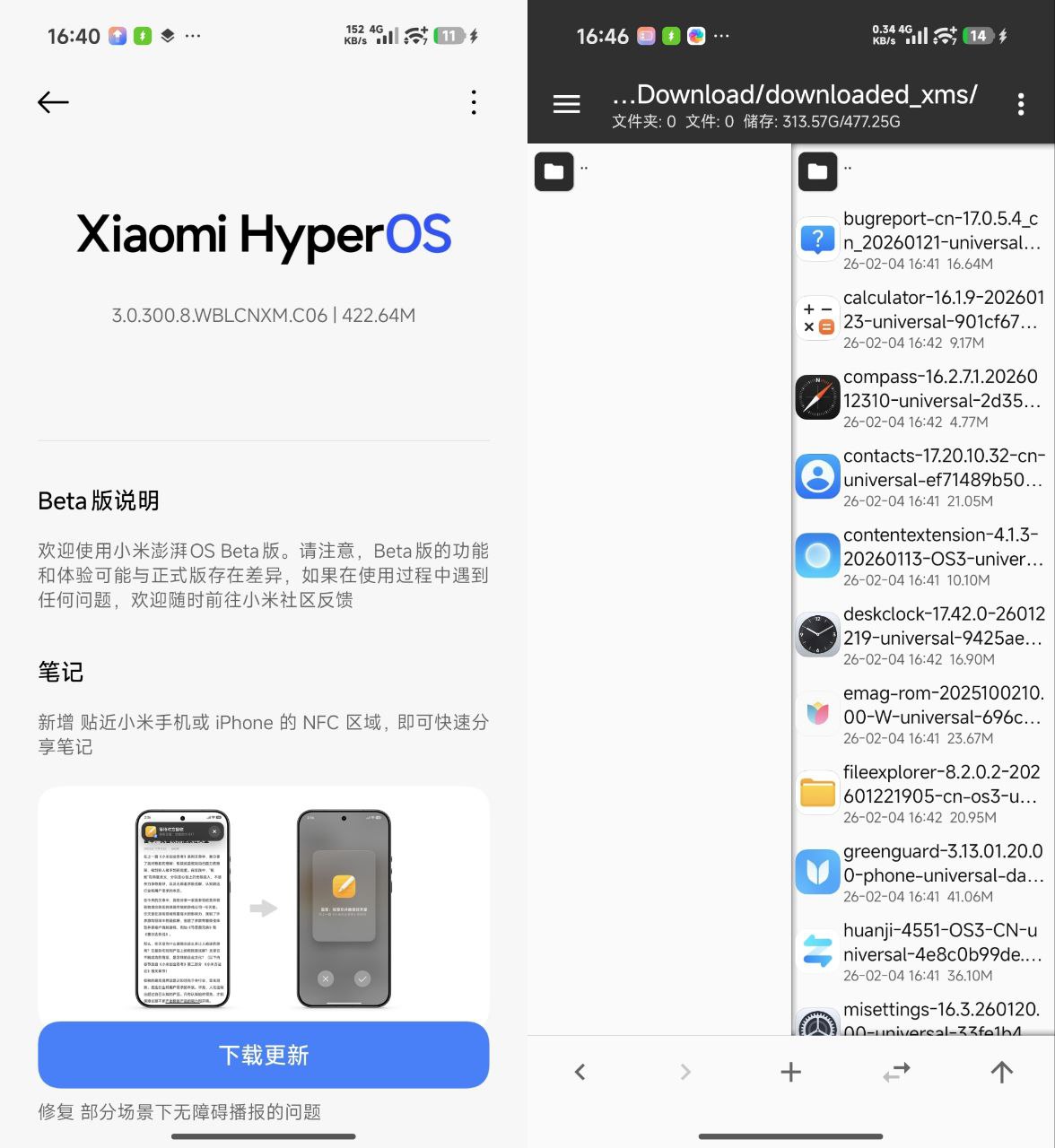
Summary: The Xiaomi 17 Pro Example
The 3.0.300.8.C06 update shared by users is the clearest example of this new era:
-
3.0.300.8: The main system base.
-
C06: The sixth SOTA patch (Hotfix or bulk app update).
This system will allow Xiaomi to address software bugs much faster. Instead of forcing users to download a massive 4-5 GB ROM to fix a small glitch, they can simply push a small SOTA package (e.g., C07) containing only the relevant module, resolving the issue in seconds.
Update Your System Apps with MemeOS Enhancer
You don’t need to wait for a full system OTA to get the latest features for your favorite Xiaomi apps. With the MemeOS Enhancer app, you can easily check for and install the latest updates for core system components like the System Launcher, Camera, Gallery, and more. The app sources verified APKs directly, allowing you to fix bugs and access new functionalities instantly.



The fact that this new Super OTA from HyperOS 3.1 is literally like downloading or updating an app from Play Store without need for rebooting at all, this is going to be a game changer fr 👀🔥
The fact that this new Super OTA from HyperOS 3.1 is literally like downloading or updating an app from Play Store without the need for rebooting at all, this is going to be a game changer fr 👀🔥
It won’t feel like your phone’s updated.:)
i need ios
complete update